Technical Review: A Developer's Deep Dive into the "3D Halloween Jigsaw Puzzle" Game Templ
Technical Review: A Developer's Deep Dive into the "3D Halloween Jigsaw Puzzle" Game Template
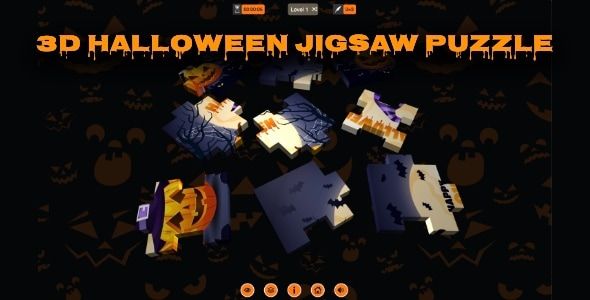
Game templates are a double-edged sword for developers. They promise a fast track from idea to app store, offering a complete, pre-packaged foundation to build upon. Yet, they can also be a labyrinth of poorly documented code, inefficient assets, and restrictive design choices. Today, we're putting one such product under the microscope: the 3D Halloween Jigsaw Puzzle - Cross Platform Puzzle Game. This review isn't about whether the game is fun for a casual player; it's a technical teardown for developers, entrepreneurs, and studio managers considering this template as a commercial base. We will dissect its architecture, evaluate its customizability, and provide a comprehensive guide to getting it from a downloaded ZIP file to a deployable application. Is this a solid boilerplate or a house of horrors?
First Impressions: Unzipping the Coffin
Upon acquiring the package, you receive a single ZIP file, approximately 50-60 MB in size. The contents are immediately revealing about the project's nature. Here's a typical breakdown of what you'll find inside:
- Halloween Puzzle Game.c3p: This is the core project file. The .c3p extension immediately identifies the engine as Scirra's Construct 3. This is a critical piece of information, as it dictates the entire development environment and workflow.
- A Documentation folder: Inside, you'll likely find a single HTML or PDF file. In my experience with similar assets, this documentation is often rudimentary. It typically covers the most basic reskinning steps—like where to find the image files—and provides a link to the Construct 3 manual for anything more complex. It rarely delves into the logic of the event sheets or explains the data structures used, which is a significant missed opportunity for a product aimed at developers.
- An HTML5 folder: This contains a pre-exported, ready-to-play web version of the game. It’s useful for a quick preview of the final product without needing to open the engine, but it's not the code you'll be working with.
- Screenshots and Promotional Materials: Standard fare for a digital asset, used for the product's store page.
The initial file structure is straightforward, but the reliance on the .c3p format means you are locked into the Construct 3 ecosystem. If you're a Unity, Godot, or Unreal developer, this template is not for you unless you're willing to learn a new, and very different, tool. For those unfamiliar, Construct 3 is a browser-based, HTML5-focused game engine that uses a visual scripting system of "event sheets" instead of traditional programming languages like C# or C++. This has profound implications for everything from performance to customization.
The Technology Stack: Built with Construct 3
Understanding that this is a Construct 3 project is fundamental. This engine choice brings a distinct set of advantages and disadvantages to the table.
The Good: Rapid Development and Accessibility
Construct 3's visual event sheet system is its main selling point. Instead of writing code, you create logic by linking conditions to actions (e.g., "On mouse click over PuzzlePiece -> Set PuzzlePiece position to mouse coordinates"). This makes it exceptionally fast for prototyping and building games with common 2D mechanics. For a jigsaw puzzle, which is heavily reliant on user input and object state management, this system is quite effective. The engine's built-in behaviors, such as Drag and Drop, Pathfinding, and Physics, can handle much of the heavy lifting that would otherwise require significant custom code.
The Bad: The "Black Box" and Performance Ceilings
The downside of visual scripting is abstraction. You don't have low-level control over the code. Debugging complex, cascading logic chains in the event sheets can become more difficult than reading a well-structured script. You are entirely at the mercy of the engine's underlying JavaScript runtime (c3runtime.js). While performance for a 2D puzzle game is rarely a concern, you will hit a hard ceiling if you try to expand this template into something more ambitious. Deep-level optimizations, custom shaders, or complex procedural generation are either difficult or impossible within the standard Construct 3 framework.
Dissecting the Event Sheets
Opening the .c3p file in Construct 3 reveals the project's true soul: the event sheets. In a well-made template, these are cleanly organized and heavily commented. In a poor one, it's a single, monolithic sheet of uncommented "spaghetti logic." This Halloween puzzle template tends to fall somewhere in the middle.
You'll typically find a few key sheets:
- ES_Main: The main game logic. This is where the puzzle generation, piece snapping, and win conditions are handled. Look for the use of global variables (a common but poor practice in Construct) versus instance variables or dictionaries for managing state. A clean project will use functions to encapsulate reusable logic. A messy one will have dozens of repetitive event blocks.
- ES_UI: Manages the user interface, including buttons, menus, level selection, and timers. This is often separate, which is a good sign.
- ES_Data or ES_Levels: Ideally, the puzzle data (image source, piece count) is managed here, perhaps by loading from an Array or JSON object. If the levels are hardcoded directly into the main event sheet, it makes adding new puzzles a tedious and error-prone process.
A point of critique is often the lack of comments. The original developer knew why a certain action was placed where it was, but

相关文章
热门文章

热门问题

等待解答
推荐专家




