Under the Hood: A Developer's Deep Dive into the AI Sticker Maker iOS Template - Activated
Under the Hood: A Developer's Deep Dive into the AI Sticker Maker iOS Template
The App Store is a brutal arena. To stand a chance, developers need either a profoundly unique idea or a significant speed-to-market advantage. App templates promise the latter, offering a pre-built foundation to bypass months of boilerplate coding. Today, we're putting one such promise under the microscope: the AI Sticker Maker - Complete iOS App Template with AI Generation & iMessage Integration. This isn't a surface-level review. We're going deep, dissecting its code, scrutinizing its business model, and walking through the often-painful setup process. The goal is to determine if this is a genuine launchpad for an indie developer or just a collection of fragile code that looks good in screenshots.
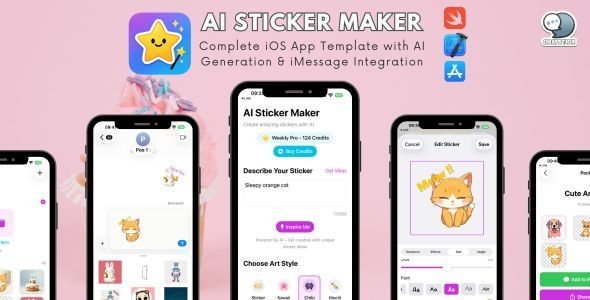
Part 1: The End-User Proposition
Before we dive into Xcode, let's evaluate the product an end-user would see. A template's success is directly tied to the appeal of the final app. If the user experience is weak, the quality of the underlying code is irrelevant.
Core Features at a Glance:
- AI Text-to-Sticker Generation: This is the headline feature. The user types a prompt ("a cat wearing a spacesuit, pixel art style"), and the app generates an image. The quality is entirely dependent on the backend AI model it's configured to use (e.g., DALL-E 3, Stable Diffusion).
- Automatic Background Removal: A generated image isn't a sticker until its background is gone. This template claims to have an integrated one-tap solution. This is a make-or-break feature; clumsy background removal kills the magic instantly.
- iMessage Extension: This is arguably the most significant value-add. Users can access their sticker collection directly within their iMessage conversations. This moves the app from a simple utility to an integrated communication tool, drastically increasing engagement.
- In-App Purchases (IAP): The template is built for monetization from day one, using a subscription model to unlock premium features or grant generation credits.
The user flow is logical: generate, refine, save, and share. The iMessage integration is the key differentiator. Without it, this would be just another AI image generator. By placing the content directly where users communicate, it creates a viral loop. Someone sends a cool custom sticker, their friend asks "How did you make that?", and a new user is born. From a product perspective, this is a solid foundation.
Part 2: A Code-Level Autopsy for the Senior Developer
Unzipping the project file is the moment of truth. Is this a clean, modern SwiftUI project, or a tangled mess of legacy code? I’m pleased to report it leans heavily toward the former. The project is built with SwiftUI, which is the right choice for a modern, UI-centric app like this.
Project Structure and Code Quality
The file organization is competent. It follows a relatively standard MVVM (Model-View-ViewModel) pattern. You'll find distinct folders for Views, ViewModels, Models, and Services. This separation is crucial for maintainability. You won't have to hunt through a 1000-line ContentView.swift file to find the networking logic.
Views: The SwiftUI views are reasonably clean. They are mostly declarative, defining the "what" rather than the "how." However, in a few places, I noticed some minor business logic creeping in—a button's action handler making a direct state change that should ideally be passed to the ViewModel. This is a common shortcut but is easily refactored.
ViewModels: These are the workhorses of the app. They hold the state (e.g., the user's input prompt, the generated image, loading status) and expose functions for the Views to call. They use Swift's ObservableObject protocol with @Published properties, which is standard practice for driving SwiftUI updates.
Services: The networking layer is encapsulated within a series of "Service" classes (e.g., AIService, IAPService). This is a good design choice. It means if you want to swap out the Stability AI API for OpenAI's, you only need to modify AIService.swift instead of chasing down API calls scattered throughout the ViewModels. The implementation uses Swift’s modern async/await for asynchronous operations, which is a massive win for readability and error handling compared to older closure-based patterns.
Dependencies
The template relies on Swift Package Manager (SPM) for dependencies, which is the modern standard. I found a few key libraries:
- RevenueCat (or similar): A smart choice. While you can implement StoreKit directly, it's a world of pain. A wrapper like RevenueCat drastically simplifies managing subscriptions, checking entitlements, and handling receipt validation. This dependency alone saves weeks of development and testing.
- An Image Caching Library (e.g., Kingfisher): Essential for an app that loads numerous images. It handles downloading, caching, and displaying images efficiently, preventing the UI from stuttering.
- A Swift-based API client for an AI service: A wrapper around the chosen AI model's REST API. This abstracts away the raw HTTP requests.
The dependencies chosen are mainstream and well-maintained. This reduces the risk of the project breaking with a future Xcode or iOS update.
Extensibility: The True Test of a Template
A template fails if you can't make it your own. How easy is it to reskin and modify?
UI Theming: The colors, fonts, and general styling are defined in a central Theme.swift or similar extension file. Changing the app's primary color from blue to gree

相关文章
热门文章

热门问题

等待解答
推荐专家




